---
updatedAt: 2025-11-03T17:19:13.000Z
agentTools:
projectIndex: https://docs.gupshup.io/llms.txt
---
# Quick Reply
It is a special type of message using which a chatbot can provide multiple options for a customer to select. It is a message type with a text message and clickable buttons. The clickable buttons are treated as a response from the user to process the journey further.
Quick Reply has the following constituents:
1. A text message (max 640 characters)
2. Buttons with a title (max 20-character limit)
Buttons support emojis and variables can be added to the buttons.
Synonyms can be added to the buttons' names.
### When to use
If there is a need to show multiple options with a message where the user can select one of the provided options, a quick reply can be used.
### Limitations
1. Applicable for Instagram channel only
### How to use
Check the video below:
### Quick Reply Node

### How to use Quick Reply Node with Dynamic Buttons
We have improved the functionality of Quick Reply(QR) Node which allows you to dynamically send a JSON Payload to extract the Quick Reply values and use these to send it to the user.
The feature is as simple as defining a JSON Payload which has a key containing the QR values and Bot Studio will iterate through the key element referred to fetch the values to be listed as the QR Buttons. Below is a representation of how this can be used:
For reference we are taking the below JSON Payload as our dynamic payload:
```
{
"categories": [
{
"name": "Personal Accessories",
"items": [
"sunglasses",
"watches"
]
},
{
"name": "Clothes",
"items": [
"premium Tshirt",
"premium shirts",
"pant"
]
},
{
"name": "Skin Care Products",
"items": [
"sunscreen",
"facewash"
]
}
]
}
```
As a use case lets assume we want to share the categories of products to a user. The above JSON has `categories` key which contains the category names in the `name` key which we need to populate. We will store the JSON object on a local or global variable and will use that in the QR Node
To do this we will refer the JSON Key `categories` on the QR Node as shown below and will map the `name` key as the iterator key inside the categories object to fetch the QR Button Names.
### Representation on Journey Canvas
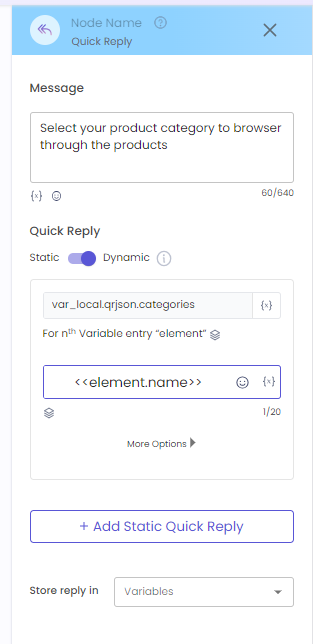
Here `var_local.qrjson.categories` denotes that the variable `qrjson` contains the payload the `qrjson.categories` is where the object to be iterated. The next placeholder `<>` denotes that the iterator should find the `name` key value for the QR Button value. The term `element` refers to the parsed value of the above element.
### Representation on WhatsApp